Strong team for product visualization
queonext & CAS Merlin CPQ work hand in hand
queonext complements CAS Merlin CPQ with a range of product visualization solutions that bring product variants and options to life. Step by step, users are guided through product configuration and supported every step of the way as they select variants and options. This transforms configuration into clarity – for faster quotes with fewer errors. Product visualization and 3D configuration run directly within the CPQ process.
As a trusted partner, queonext brings over 20 years of experience, more than 120 employees across five locations, and extensive expertise in UX, 3D/CAD processing and front-end development.
Your benefits with queonext & CAS Merlin CPQ
An inspiring product experience
2D/3D visualization brings complex products to life, creating more engaging and effective sales conversations.Faster path to clear quotes
Variants and options are clear at a glance, helping customers make confident decisions.Fewer errors, higher quality
Visual validation checks ensure consistent quotes with fewer errors.The technical background – simply explained
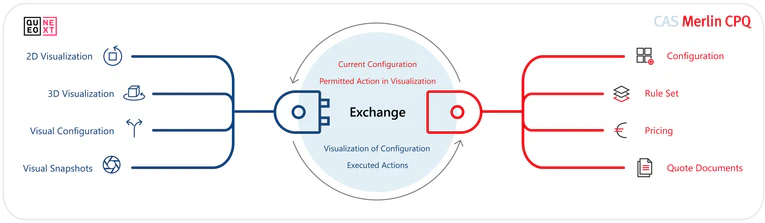
CAS Merlin CPQ manages configuration, rule sets, pricing and quote documents. queonext adds an embedded 2D/3D front end that connects directly to the CPQ through defined interfaces. All configuration and selection information is exchanged bidirectionally. The visualization module remains fully updatable and stays aligned with every CAS Merlin CPQ release.
To get started, all you need is a defined variant or rule model in CAS Merlin CPQ, along with an initial, manageable dataset for visualization. Other systems such as PIM, PLM or ERP can be integrated later, but aren't a requirement to get started. In a short assessment, we'll work together to identify the best integration path for your business.
USE CASE 1
Product visualization during configuration
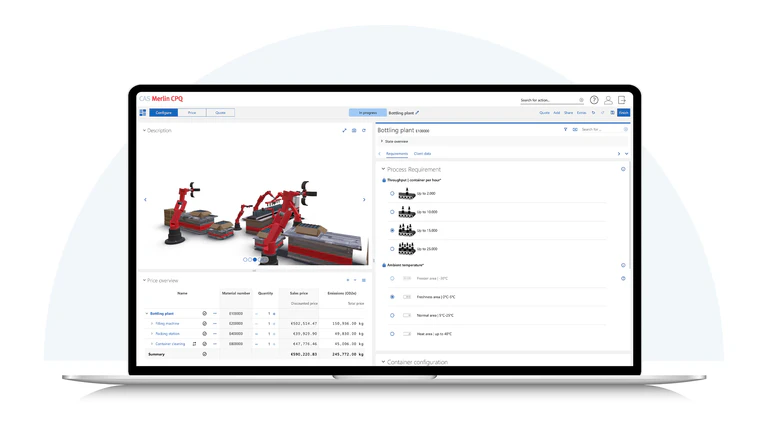
In CAS Merlin CPQ, the individual configuration is displayed in real time as a 2D or 3D view during the live process. Selected options, dimensions and the overall structure are visible instantly.
This makes it far easier to understand how components interact, particularly with complex machinery, systems or modular products. Rather than lists and part numbers, sales teams see exactly what the final solution will look like.
Sales and engineering work from the same visual foundation. This reduces follow-up questions, improves coordination and leads to more consistent quotes.
USE CASE 2
Custom configurators for end customers
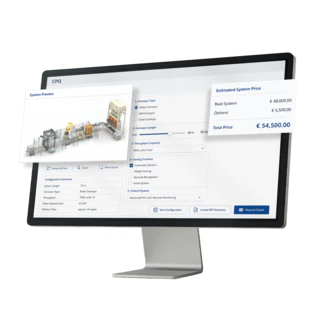
For web-based use, custom configuration interfaces are built designed to match your brand, product portfolio, and target audience. Users are guided step by step through the configuration process, supported with interactive 2D or 3D visualizations.
If your requirements for the user interface and branding go beyond the standard capabilities of CAS Merlin CPQ, a custom configuration interface can be built that fits seamlessly into your brand. Behind the scenes, the powerful calculation engine of CAS Merlin CPQ remains available at all times. At the same time, the CAS Merlin CPQ modeling interface makes it possible to populate this custom interface flexibly with content, rules and variants.
USE CASE 3
Data preparation for visualization in the CPQ solution or a custom end-customer configurator
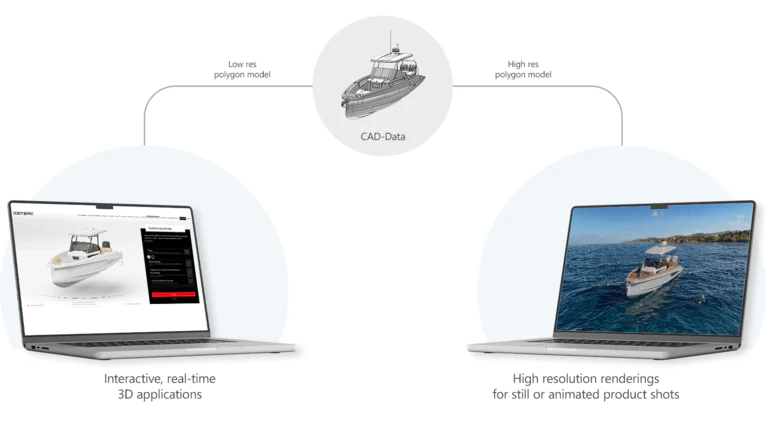
To enable visualization, whether in CPQ or on the web, existing CAD data, 3D models, product images, and variant and option data are structured and prepared for use.
Any missing or inconsistent data can be added or standardized. This creates a solid foundation for visualization regardless of your starting point.